Manik Agra
Microsoft Office Tutorial
 My boss confused how to make the unit square with symbols m2 where the number 2 is located a little ride on Microsoft Office Excel 2007. For other versions of Microsoft Office Excel, the principle is the same.
Microsoft Office Excel is one of the Microsoft products that are used for data processing in the form of figures and graphs (spreadsheet).
How to make it ??? See the picture above…..
Selection number 2 and then right...
My boss confused how to make the unit square with symbols m2 where the number 2 is located a little ride on Microsoft Office Excel 2007. For other versions of Microsoft Office Excel, the principle is the same.
Microsoft Office Excel is one of the Microsoft products that are used for data processing in the form of figures and graphs (spreadsheet).
How to make it ??? See the picture above…..
Selection number 2 and then right...
Manik Agra
Google SketchUp Tutorial
 Google SketchUp can import CAD drawing files (*. dwg) so that the overall drawing process becomes faster.
I find this feature in Google SketchUp 7 and no longer exists in version 8. With this feature you can import .dwg CAD (Computer Aided Design) drawing with good and the results are "snap".
Import results from Google SketchUp 7 resulted in exactly with the original drawings on CAD software, including the units….. as long as it...
Google SketchUp can import CAD drawing files (*. dwg) so that the overall drawing process becomes faster.
I find this feature in Google SketchUp 7 and no longer exists in version 8. With this feature you can import .dwg CAD (Computer Aided Design) drawing with good and the results are "snap".
Import results from Google SketchUp 7 resulted in exactly with the original drawings on CAD software, including the units….. as long as it...
Manik Agra
Google SketchUp Tutorial
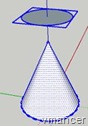 In this way the most complicated Google SketchUp Tutorial than others. Even with experience may rarely use this method to create a truncated cone.
Much easier to use the Follow Me tool or Scale tool method.
To use this method, you must set up cones and one other field. Create a group for that field. Then use these fields to cut off part of the cone. For clarity, please refer to the following Google Sketchup interactive tutorial. Please...
In this way the most complicated Google SketchUp Tutorial than others. Even with experience may rarely use this method to create a truncated cone.
Much easier to use the Follow Me tool or Scale tool method.
To use this method, you must set up cones and one other field. Create a group for that field. Then use these fields to cut off part of the cone. For clarity, please refer to the following Google Sketchup interactive tutorial. Please...
Manik Agra
Google SketchUp Tutorial
 This Google SketchUp Tutorial is a continuation of Make a truncated cone (the first way).
Now I show how to create a truncated cone in other way, use Follow Me tool to create a truncated cone. Should be prepared a trapezoid and a circle as shown in the picture.
For more clearly, follow the interactive tutorial below. Please note, because it is an interactive tutorial so you need to click the Play/Next button (and following button)...
This Google SketchUp Tutorial is a continuation of Make a truncated cone (the first way).
Now I show how to create a truncated cone in other way, use Follow Me tool to create a truncated cone. Should be prepared a trapezoid and a circle as shown in the picture.
For more clearly, follow the interactive tutorial below. Please note, because it is an interactive tutorial so you need to click the Play/Next button (and following button)...
