Ashampoo Snap 8: Simply capture everything [Giveaway & 50% Coupon]
Giveaway
0 Responses
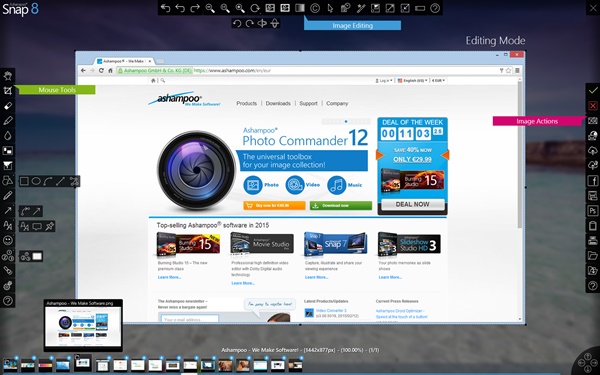
Ashampoo Snap 8 is perfect software and simple used to catch still image or record video from the screen.
I have been using Ashampoo Snap since version 3. I loved it at that time because the feature to capture image on the screen with a variety of modes, can also directly add a watermark. This software make me prety much easier when take screenshot especially directly add some note there, or highlight and watermark. You have a change to get Ashampoo Snap 8 free license here.
Ashampoo Snap 8 features detail
- Auto-insert watermarks
- Instantly capture all visible desktop windows as objects
- Use color picker to capture colors across applications
- Create timed captures
- Create collages from multiple screenshots
- Windows 8 support, capture new user interface
- Full 32bit transparency support (RGBA)
- Capture menus
- Provide comments with microphone during webcam recording
- Freely adjust webcam display position and size
- Record webcam during video captures
- Simplified handling for video and mouse effects
- New video capture control bar
- Improved MP4/WMV playback based on new Windows Media Foundation
- Timed video capturing
- Use counter to limit recording length
- Pause and continue recordings
- View length of recording
- Real-time adjust capture area during recording
- Capture webcam
- Add mouse click effects
- Text recognition support for 6 languages (English, French, German, Spanish, Turkish, Russian)
- Extract text from images with text recognition
- Use OCR to create text objects and copy to system clipboard
- Capture multiple monitors up to 4k resolution
- New selectable modern user interfaces
- User-defined hotkeys for various functions
- Optimized for current processors
- Extended selection options for multi-display environments
- Position selections with cursor keys
- Ultra-smooth workflow with 1-click operations and optimized drawing routines
- All objects/settings remain editable thanks to smart background versioning
- Smarter work environment with intelligent background versioning for maximum file safety
- Enhanced PDF support through Windows Server compatible PDF engine
- More performance through multi-core support
- Video auto-resizing for extreme display resolutions
- Auto-resize images before sending
- Supports WEBP as output format
- Set custom application for PSD files
- Print multiple files at once
- Upload to Dropbox, Google Drive and Microsoft Sky Drive
- Export to JXR and PSD with layers for easy interchangeability
- Upload to Ashampoo Web and share unique internet links, now with support for videos
- Send as email, Use browser-based email clients (Google Mail, Yahoo Mail, Mail.ru)
- Integrated Ashampoo webspace uploader
- Copy objects to system clipboard while in edit mode
- Copy objects between screenshots
- Work with curved arrows and lines for maximum flexibility
- Support for different cursor styles
- Exit edit mode even with multiple open projects
- Insert locally saved images into screenshots
- Improved object scaling during size adjustments
- Enhanced filling tool with new transparency and tolerance settings
- Clone objects for simple reuse
- Select from various pre-defined harmonious color/style configurations with live previews
- Work faster with 1-click object selection/deselection
- Edit and add custom color/style configurations for quick access
- Use quick editing to add/edit text elements at a single click/keystroke
- Draw continous lines with the point-line tool
- Apply gradients to many objects
- Quickly select suitable effects with live previews
- Select screenshot colors with color picker
Ashampoo Snap 8 Giveaway
Get a free license of Ashampoo Snap 8 giveaway here.
I think the giveaway still running.
Or here you can get Ashampoo Snap 8 free license on Easter Giveaway event by WonderFox (valid before April 18th, 2017.
Or here to buy Ashampoo Snap 10 with 50% coupon
How to use Ashampoo Snap 8 OCR Youtube Video Tutorial
Related Topics
Blu-ray Player Windows 7 [GIVEAWAY 5 LICENSES]

WinX DVD to iPad Ripper for Mac [GIVEAWAY]

MacX iPhone iPad Video Converter [Giveaway]

FLAC To MP3 Converter [Christmas Giveaway]
Leave a reply to this post
Your email address will not be published. Required fields are marked *
