Google SketchUp Tutorial: Make a truncated cone (the third way)
Google SketchUp Tutorial
0 Responses
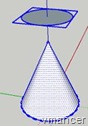 In this way the most complicated Google SketchUp Tutorial than others. Even with experience may rarely use this method to create a truncated cone.
Much easier to use the Follow Me tool or Scale tool method.
To use this method, you must set up cones and one other field. Create a group for that field. Then use these fields to cut off part of the cone. For clarity, please refer to the following Google Sketchup interactive tutorial. Please note, because it is an interactive tutorial so you need to click the Play/Next button (and following button) manually.
Related Google SketchUp Tutorial:
Related Topics

Chatwing: A Simple Way of Use [Tutorial]

Split – recombine files with 7zip
Universal file format for video on any mobiles [TUTORIAL]

Learn Matrix (Determinant) with Microsoft Mathematics
Leave a reply to this post
Your email address will not be published. Required fields are marked *
